Find Speech Regions in Audio with Silero VAD
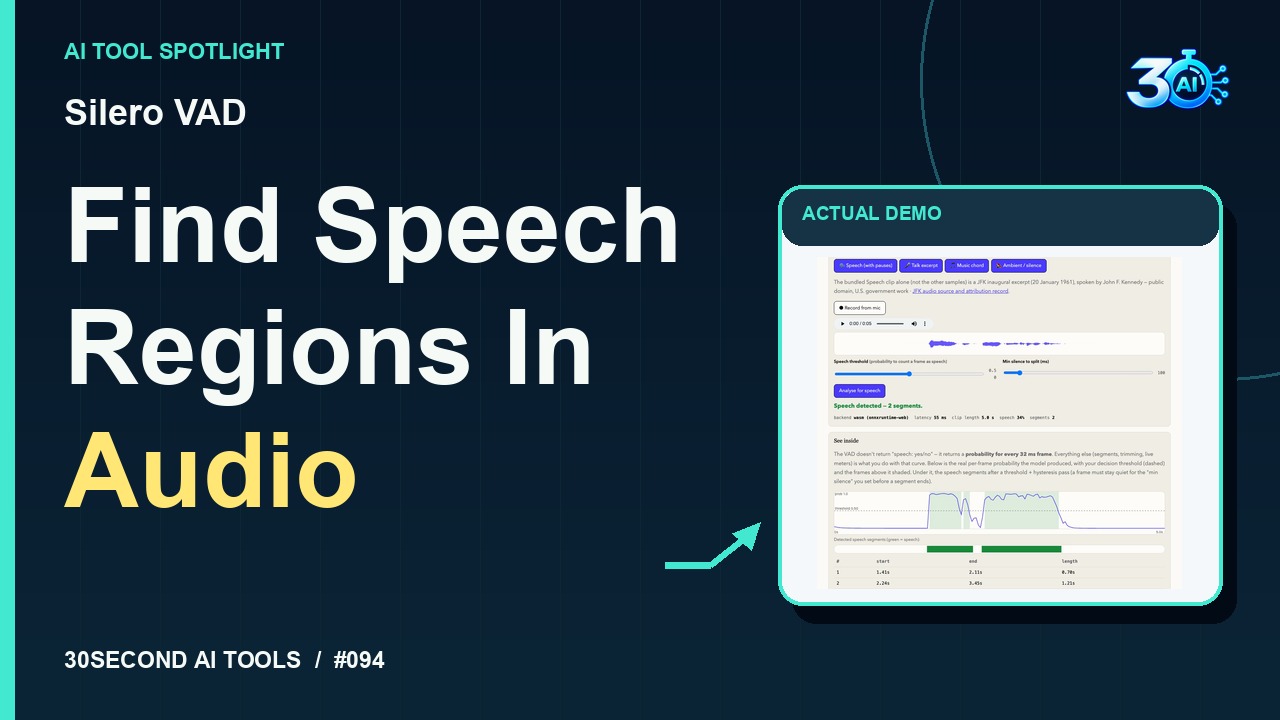
See Silero VAD identify two speech regions in an original fictional workshop announcement. The browser demo displays a speech probability curve and segment start and end times. It detects speech activity rather than transcribing words.
The useful part
Silero VAD is featured here for one specific job: browser-based speech activity detection. This guide focuses on that workflow so you can decide whether it fits your task before trying it.
Browser-based speech activity detection
What happened in the demo
Silero VAD finds speech regions in audio. Here’s our fictional workshop announcement, with a second of silence added at each end. Using these settings, the five-second clip returns two detected speech segments. Read their start and end times beside the probability curve. That helps you locate speech before editing. It detects activity, not words.
The example used in the reel
A small, specific input makes the result easier to inspect. Use the example below to understand the scope of the recorded workflow; it is not a promise that a new run will produce an identical result.
Original channel-owned workshop voice announcement with one second of added silence at each end. Threshold 0.50; minimum silence 100ms.
Try it yourself
- Load Silero VAD
- Choose the owned workshop announcement with added silence
- Run Analyse for speech at the recorded thresholds
- Inspect the curve and segment times
Start with material you own or have permission to use. Save the original and compare it with the output before moving the result into a real project. If the interface has changed, follow the current official instructions linked below.
What to check before using the result
The genuine result has segments 1.41–2.11s and 2.24–3.45s. It detects speech activity rather than words; the separate reviewed export keeps the table visible.
Keep the task narrow on your first attempt. Check the details that matter to your use case rather than judging only whether the result looks polished. A successful short example is a useful introduction, not a benchmark of the whole product.
Access, free demos & limits
Free public demonstration verified on 2026-11-02 through live page research and recorded example evidence. No account or payment required. An approximately 2 MB model download is required; audio processing stays on-device per the provider. The recorded demonstration used no microphone.
Availability notes refer to the dated demonstration or source check. Features, limits and sign-in requirements can change. Check the official site before starting a larger project.
Visit Silero VAD ↗Sources & context
- webai.show/models/silero-vad/ ↗Source checked 2026-11-02
This guide expands the channel’s recorded example and the official sources checked for that reel. Generated results are examples, not endorsements or guarantees. Read our editorial policy.
Keep exploring
All tools →
CamemBERT POS Tagger
On-device part-of-speech predictions with color-coded words and raw French TreeBank tags
Read the guide