Design & images
Semantic Image Search Client
Search an existing photo collection with a natural-language description
Read the guide 30SecondAIToolsTHE PRACTICAL AI FIELD GUIDEWatch the channel ↗
See ImgUpscaler’s free single-image tool enlarge an original fictional house illustration from 32 × 32 to a verified 64 × 64 pixels using the 200 percent option. Batch processing is paid. Official source checked October 26, 2026: https://imgupscaler.com/
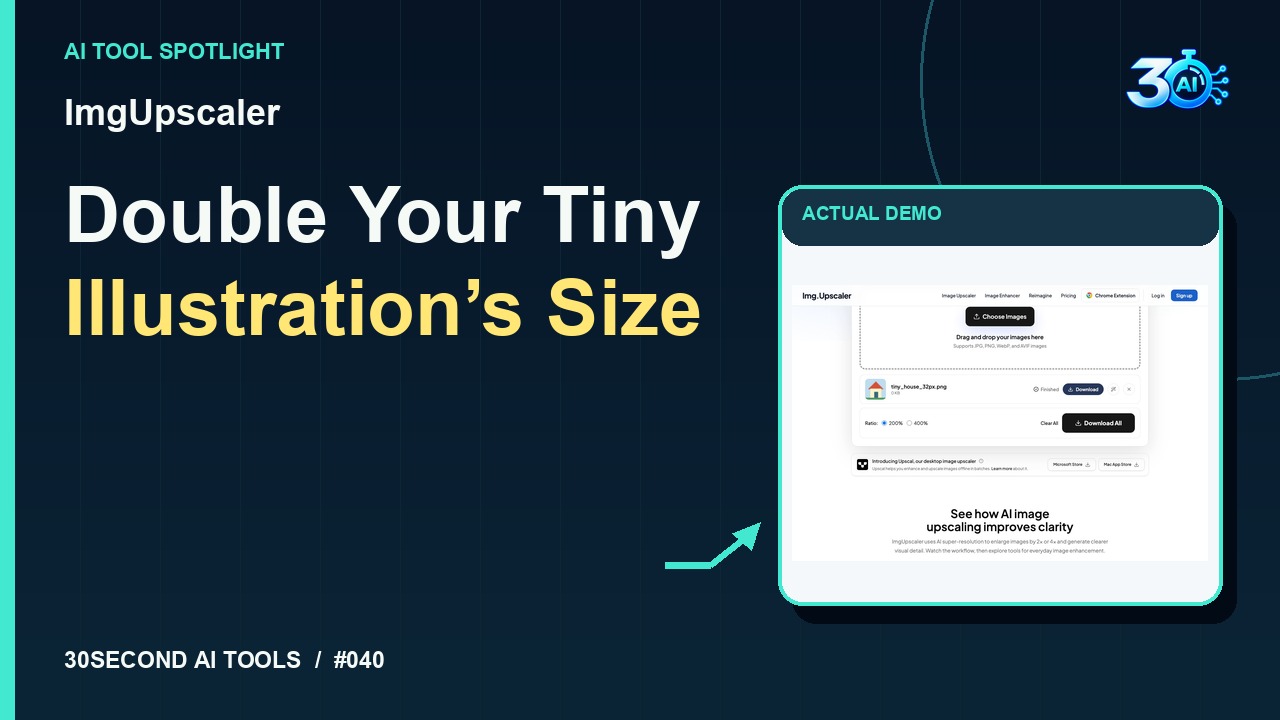
ImgUpscaler is featured here for one specific job: free single-image 2x enlargement. This guide focuses on that workflow so you can decide whether it fits your task before trying it.
Free single-image 2x enlargement
Give it twice the width and height! In ImgUpscaler, this fictional house starts at just thirty-two by thirty-two pixels. The recorded demo uses the free single-image tool with two hundred percent selected. Here’s the Finished status, followed by the actual downloaded image. Its verified dimensions are sixty-four by sixty-four pixels. That confirms the size increase for this little illustration.
A small, specific input makes the result easier to inspect. Use the example below to understand the scope of the recorded workflow; it is not a promise that a new run will produce an identical result.
Select tiny_house_32px.png, an original fictional 32 by 32 pixel house illustration, keep the 200 percent option and upscale it.
Start with material you own or have permission to use. Save the original and compare it with the output before moving the result into a real project. If the interface has changed, follow the current official instructions linked below.
More pixels do not guarantee recovered detail. Upscaling can introduce invented texture.
Keep the task narrow on your first attempt. Check the details that matter to your use case rather than judging only whether the result looks polished. A successful short example is a useful introduction, not a benchmark of the whole product.
Official site checked on 2026-10-26 confirms free single-image upscaling; batch processing requires a paid plan. The recorded example verifies this single-image 200 percent demonstration without an account or payment.
Availability notes refer to the dated demonstration or source check. Features, limits and sign-in requirements can change. Check the official site before starting a larger project.
Visit ImgUpscaler ↗This guide expands the channel’s recorded example and the official sources checked for that reel. Generated results are examples, not endorsements or guarantees. Read our editorial policy.
Search an existing photo collection with a natural-language description
Read the guide